Zero Mass Guides & Walkthroughs
From first Steam launch to automated fleets — every Zero Mass tutorial in one place.
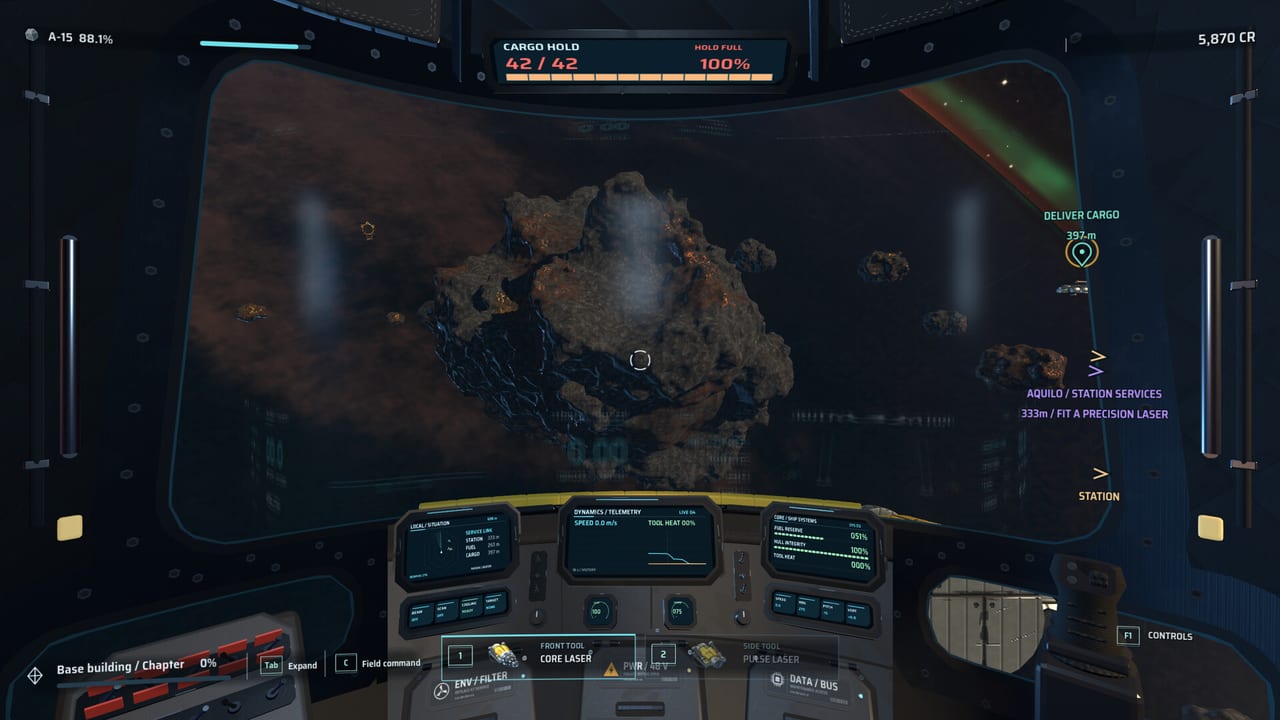
Welcome to the Zero Mass Guides Hub. This free Steam space-mining incremental by solo developer veta (published by Wombex Games) asks one clear question: how fast can you take a procedurally generated asteroid from 100% mass to 0%? You carve rock with your mining ship, haul ore to a space silo, spend profits on tools and hull upgrades, then unlock drones and surface drilling rigs that keep digging while you manage the wider job. The base campaign runs roughly 5–6 hours across missions, multiple mining sites, and the full upgrade tree—no paywall on the core loop.
Use this hub as your map. New pilots should start with Getting Started, then learn inputs in Controls, master the carve-and-haul loop in the Mining Walkthrough, scale output with Drones & Automation, and—if you want friends on the same rock—read Co-op (Crew Operations). Cross-check upgrade priorities on the Tier List Hub, optional packs in the DLC Guide, and PC specs in System Requirements.
Who these guides are for
- Brand-new players who just installed from Steam (or tried the demo) and want a clean first-hour path: session setup, asteroid size choice, docking, and when to spend on upgrades.
- Solo miners who understand the fantasy but want sharper habits—cutting patterns, cargo discipline, contract timing, artifact scanning, and hazard awareness.
- Automation-focused players ready to assign mining vs collection drones, expand the fleet via research, and place surface drills with a work marker within roughly 50 meters.
- Crews evaluating Crew Operations online co-op: host-only purchase, free guests, shared contracts, and role splits (excavate / haul / collect).
Zero Mass is deliberately focused. There is no sprawling 4X empire or survival chore list—just you, your ship (external or cockpit view), and an asteroid that must disappear. That focus is why short, practical guides beat long lore dumps: every tip should shave minutes off the path to zero mass.
Recommended reading order
- Getting Started — Install, demo vs full game, first session choices, and the mine → haul → upgrade loop.
- Controls — Keyboard/mouse basics, partial controller support, thrust and cargo, external vs cockpit camera, markers for drills.
- Mining Walkthrough — Surface cuts, exposing deposits, silo runs, contracts, artifacts, hazards, and small/medium/large asteroid choices.
- Drones & Automation — Mining vs collection drones, priorities, drone assembly research, surface drilling rigs, and balancing manual vs automated work.
- Co-op (Crew Operations) — How online co-op DLC works, host/guest rules, and teamwork on shared rocks.
Between those deep dives, skim the Tier List Hub when you are unsure which ship or tool upgrades to buy next, open the DLC Guide before spending on Deep Field Operations, Custom Colours, Aquilo Station, or Crew Operations, and confirm your PC against System Requirements if performance feels off.
What “good play” looks like
Early sessions reward patience over greed. Clear a small asteroid cleanly, dock, sell, and unlock the upgrades that make the next cut faster. Mid-game shifts toward throughput: better tools, fuller cargo holds, and the first drones so collection no longer steals your entire shift. Late base-game play is about orchestration—you fly the high-value cuts while drones and surface rigs grind mass down in parallel. Optional DLCs extend that fantasy (larger fields, cosmetics, co-op) without gating the free campaign.
Hazards and buried finds keep jobs interesting. Debris storms, electrical trouble, wreck recovery, and hostile encounters show up as you dig deeper; scanners and research turn artifacts into better tools. Treat every unexpected ping as both risk and opportunity, not a reason to abandon the mass counter.
Community and trailer
Official discussion lives on the Zero Mass Discord. For a visual sense of the loop before you boot Steam, watch the official trailer on the Getting Started page and the longer lets-play embedded in the Mining Walkthrough. French players can also follow the deep gameplay video linked from Drones & Automation.
How to use this wiki while you play
Keep this hub bookmarked. After each major unlock—new tool tier, first drone bay, first surface rig—return here and jump to the matching guide instead of scrolling Steam discussions for half-remembered tips. Internal links always use trailing slashes and stay on your language path after generate. When a patch changes upgrade costs or co-op rules, we update these pages and the shared facts file so the whole site stays consistent.
If you are mid-asteroid and only need one answer, skip straight to the child page that matches your question. If you are planning a fresh campaign or a co-op night, read Getting Started then Co-op back-to-back. Either way, the goal is the same number on the HUD: zero mass, job complete, next rock ready.
Frequently Asked Questions
Quick answers to the most common Zero Mass questions.
Where should a brand-new Zero Mass player start?
Install from Steam, then follow Getting Started for the first-hour loop. Skim Controls next, then the Mining Walkthrough once you are comfortable flying and docking.
Is the base game free, and do I need DLC to finish it?
Yes—the base game is free on Steam and includes missions, multiple sites, and all base upgrades (about 5–6 hours). DLCs such as Crew Operations, Deep Field Operations, Custom Colours, and Aquilo Station are optional; see the DLC Guide.
Does Zero Mass support co-op out of the box?
Online co-op requires the Crew Operations DLC. Only the host needs to buy it; guests join free. Read the Co-op guide for roles and shared contracts.
What is the difference between the demo and the full free game?
The demo lets you sample the carve-and-haul fantasy before committing time. The full free release unlocks the complete mission path, upgrade tree, and automation options described across these guides.